I’m running GP 4.7. Would like to block (silence) a few notes in the midi in block so that when I play that note it plays nothing. For example I want to block just the C1 even though the defined range includes that note. How is that accomplished?
For GP4, if it’s just a couple of notes, you could throw a widget or two on to a panel in a rackspace and learn the note. Since learned MIDI messages are not passed on to MIDI In blocks in GP4 (in GP5 you can optionally allow learned messages to be passed on), that would block the notes. If you want to block ranges of notes, you could also use a scriplet.
That said, for anybody who wants to do the same thing and has GP5, there is an internal Chord Maker plugin that can actually be used to block notes as well as making chords. I don’t think that feature is well known, but it’s great for protecting yourself from bum notes in certain songs 
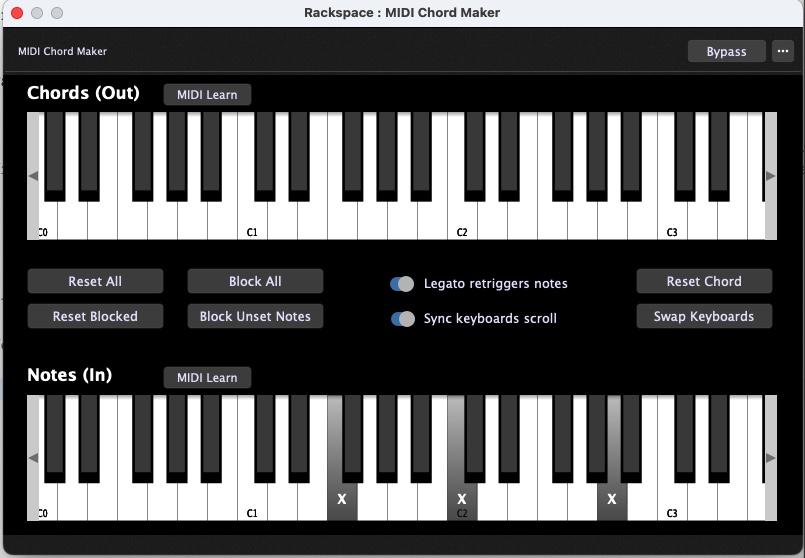
Wow, I didnt think of that. I asked last year about doing this and didnt really understand the answer, but it was a lot more convoluted than this. Thanks for including that feature
I ended up accomplishing this by creating multiple midi-in blocks, each with it’s own mini-range. That allows me to “slience” those few notes (which still play as I’d like when mapped to a different instrument / midi-in block).
Thanks for the suggestion!
Just to chime in and say that there is also version 4.8.2. (free update for v4.x Deskew customers)
And, of course, the latest build v5.1.4 (not a free update for v4 users)