Is it possible to set up a keyboard controlled button to block all midi coming in to GP?
I have a button on my MODX set to mute GP, I use this when I want to use the internal sounds only but I have GP also running. This works but can cause GP, or rather plugins, to get in to a bit of a mess if im hitting lots of buttons on the MODX.
I figured it best to just disconnect any midi signal going in to GP. I sort of know how to do it in a Rackspace, but Id prefer to do it at a global level if possible.
I wonder whether a button to filter all midi from your controller is the best option. Won’t there by times when you might be using internal MODX sounds in the same rackspace as GP sounds? (I know I do this a lot in my set up).
Thanks Jeff. I normaly have GP running and use my MODX as a controller. Never in tandom with the internal sounds from the MODX.
Sometimes i get bored iwith what im doing with GP (practicing songs for the band) and just want to play some of the internal sounds for a bit of distraction. The MODx is quite new and i feel i need to explore it more. I just don’t want to close GP down as ill probably go back to it.
There are many ways i could do this, even pull the midi cable out, im just asking very specifically if i can just do it with a button press. Call it laziness lol. The mute button works fine for this, but the plugin’s can go a bit haywire and there is the possibility of messing up my Rackspaces.
As for you last point, i now have ESP (i have the M7), so have all the MODX sounds in GP already, so no need to integrate the hardware version. I was planning on doing using the internal sounds at some point, but ESP seems easier and makes the set up more portable. Plus i can stay in DAW mode.
Thats an option yes. I had thought about that but thought it might be nice to keep GP as i was last using it, so still on the last used Rackspace for when i want to continue.
Again, just wondering if i can do it how i want, its really not a deal braker and i can easily use other ways to get round this.
I’m not sure how this could be done with a button since there are an arbitrary number of midi ports so I’m not sure how one would easily target specific ports for different users.
I suppose it could be done quite easily by adding a new GPScript function to enable or disable a port by name but I wonder how important this really would be.
I suppose this could also be done by a new action but I would be extremely concerned thst someone would forget and panic in the middle of a show wondering why GP stopped working
Edit: it occurs to me that if you just open the Options dialog, audio stops working But that doesn’t solve the problem if you’re routing your external synthesize it through gig performer
Thanks David. I was hoping that it would be an all or nothing approach. Like just disable any midi from any port. A bit like bypassing a midi in block but for everything.
Im not routing any audio through GP at all. I have the MODX wired in to my interface directly.
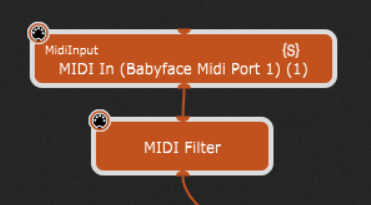
Could you just put a midi filter block after your MODX midi input block and have the filter set to “Block all”, then set a widget to put the filter in bypass mode when you want to let midi through?
There might be more than one MIDI In block (think splits) and different rackspaces would have different numbers of those blocks. That’s why I suggested just having an empty rackspace.
I’m really quite hesitant to create an action that would disable a MIDI port - while it would be easy to do, I would be really concerned about it getting triggered by mistake and causing confusion.
But wouldn’t you have to do this for every rackspace? I think he’s trying to avoid that
I think for the OP’s purpose it would make sense just to include an empty default rackspace in each set (personally, I have one between every song in a set) and just go to that if you want to use the MODX internal sounds. (Basically repeating dhj’s suggestion)
Why not simply switch your MODX to “LOCAL OFF” to separate the keys/midi out from the internal sound engine, and then make the desired connections within GP?
Benefit from the “Midi Merge” option of GP’s MIDI-IN blocks and from the global processing tools (From/To Global Rackspace).
I would try this:
GLOBAL RACKSPACE:
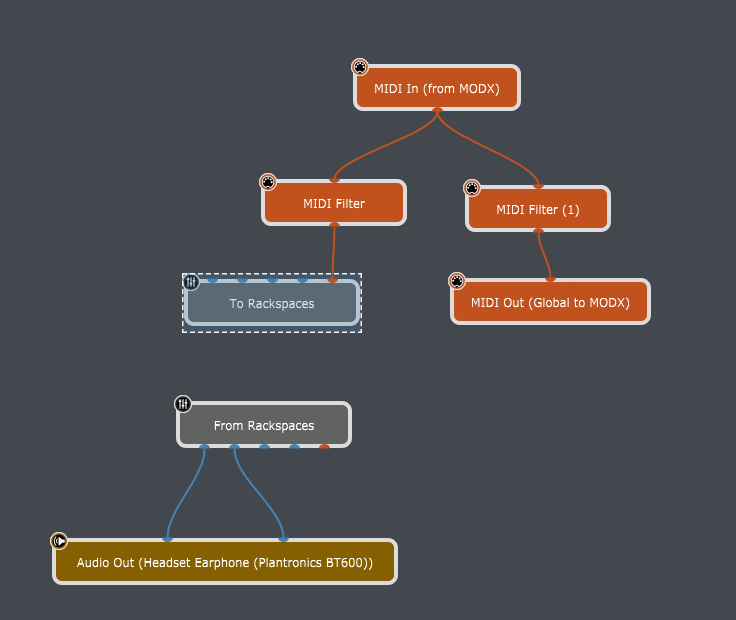
Get all the incoming midi from your MODX in the global rackspace, then distribute it to separate branches: One goes directly back into your MODX, the other continues to the local rackspaces.
Both have MIDI-Filter to cut off midi (i.e. Note-On) from being passed on.
The filters could be controlled via widgets (set or bypass) and would instantly result in what you plan to do.
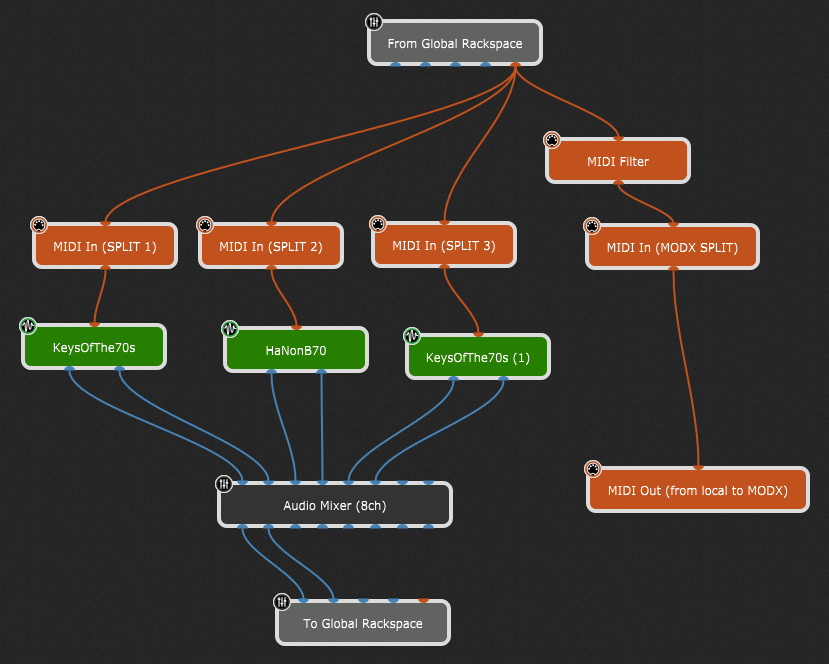
Midi comes in from the Global Rackspace (if not blocked beforehand), then goes into separate MIDI-IN blocks (“Midi Merge” must be enabled!) to realize any splits or transpose, or…
which then goes to the corresponding plugins (and so on).
At the same time you could create a second branch for midi-signals to go back out to your MODX which you could use to combine plugins with the internal sound engine of your MODX (also using an additional MIDI-IN block to probably use another split/transpose/…), which can be activated or bypassed at will (–> midi filter).
All the audio then goes back to the Global Rackspace and only there to the final audio out.
→ if something had to be changed, it will be only at one place!
Maybe i’ve missed something, but that’s what i would try to do!
Ok, so it seems the empty rackspace is one of the better options. Thanks David. I can also disable USB midi in the MODX itself, so both options are easy enough to do.