Is this possible? So that it reacts on incoming ‘note on’ message from a different keyboard than the one where the AutoSustainerScriptlet is used on?
What scriptlet are you talking about?
And how looks your wiring view?
If it’s a scriptlet, it responds to the data sent by whatever MIDI source is connected to it, but it has no way of knowing which source that data came from.
It’s the Autosustain scriptlet that comes with GP5
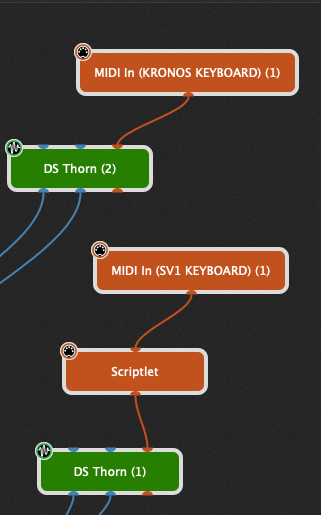
OK and now you want the scriptlet react on Notes coming from your KRONOS KEYBOARD ?
Or do you want to stop playing Note on DS Thorn as soon as you play a note on your KRONOS?
Is this the scriptlet code?
var

nt, nt2 : NoteTracker
hold : boolean = true


on_off("off/on") : parameter "off", "on" = "off"
stop("stop") : parameter "off", "on" = "off"


Initialization
   SetInfoMessage("AutoSustainer")
   SetDisplayMessage("V1.00 @LeeHarvey")
End

On NoteEvent(m : NoteMessage)
    if on_off == "on" then
        if (m.IsNoteOff()) then
            if hold == false then
                SendNow(m)
            end
            NoteTracker_GotNote(nt, m)
	        if NoteTracker_NoteOnCount(nt) <= 0 then
	            hold = false
            end
            NoteTracker_GotNoteOn(nt2, GetNoteNumber(m))
	    else
	        if hold == false then
	            NoteTracker_StopAllPendingNotes(nt2)
	            hold = true
	        end
		    NoteTracker_GotNote(nt, m)

		    SendNow(m)
        end
    else
        if NoteTracker_NoteOnCount(nt2) > 0 then
            NoteTracker_StopAllPendingNotes(nt2)
        end
        SendNow(m)
	end
End

On ParameterValueChanged Matching on_off
    NoteTracker_StopAllPendingNotes(nt2)
    NoteTracker_Clear(nt)
end

On ParameterValueChanged Matching stop
    if stop == "on" then
        NoteTracker_StopAllPendingNotes(nt2)
        hold = false
        stop = "off"
    end
end
You could match a widget to the stop parameter of the scriptlet and in a rackspace script you can react on incoming NOTE ON messages from your KRONOS KEABOARD and set the widget value to 1.0
Exactly this
It’s this one: Initialization
SetInfoMessage(<<<This scriptlet allows you to sustain notes.
When you release all notes and start pressing new notes, the previously held
notes will be automatically stopped. You can explicitly stop all sustained
notes from a widget by attaching it to the StopSustain parameter
)
SetDisplayMessage(“Copyright (c) 2021 Deskew Technologies, LLC”)
End
var
StopSustain : Parameter = 0.0 // This will be a command parameter
var
Sustainer: AutoSustainer
on NoteEvent(m : NoteMessage)
AutoSustainer_Play(Sustainer, m)
end
// Called when a parameter value has changed
On ParameterValueChanged matching StopSustain
if StopSustain > 0.5
then
AutoSustainer_Stop(Sustainer)
StopSustain = 0.0 // Reset for next time
end
End
I did this. But than I can let it react only to a certain midi note and I want it to react to any note I play on the Kronos.
Use this rackspace script, quick&dirty
//$<AutoDeclare>
// DO NOT EDIT THIS SECTION MANUALLY
Var
   SY : MidiInBlock
   KRONOS : MidiInBlock
//$</AutoDeclare>

On NoteEvent(m : NoteMessage) from KRONOS
 SendNow(KRONOS, m)
 if IsNoteOn(m) then
  AllNotesOff(SY)
 end
End
Give your MIDI In Blocks the handles KRONOS and SY
Now each incoming Note On message from the KRONOS send an AllNotesOff Message to SY.
Now I got this message: Plugin ‘SY’ not found in rackspace ‘We Gaan Het Maken’
Scripting has been disabled for this rackspace
We Gaan Het Maken (Script Entity: Rackspace) - Plugin ‘SY’ not found in rackspace ‘We Gaan Het Maken’
No source information available - check GPScript options
Scripting has been disabled for this rackspace
Uh oh - GP Script runtime error
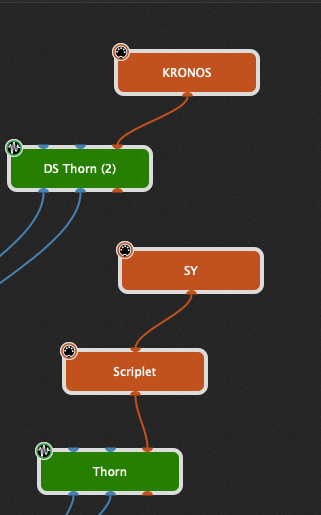
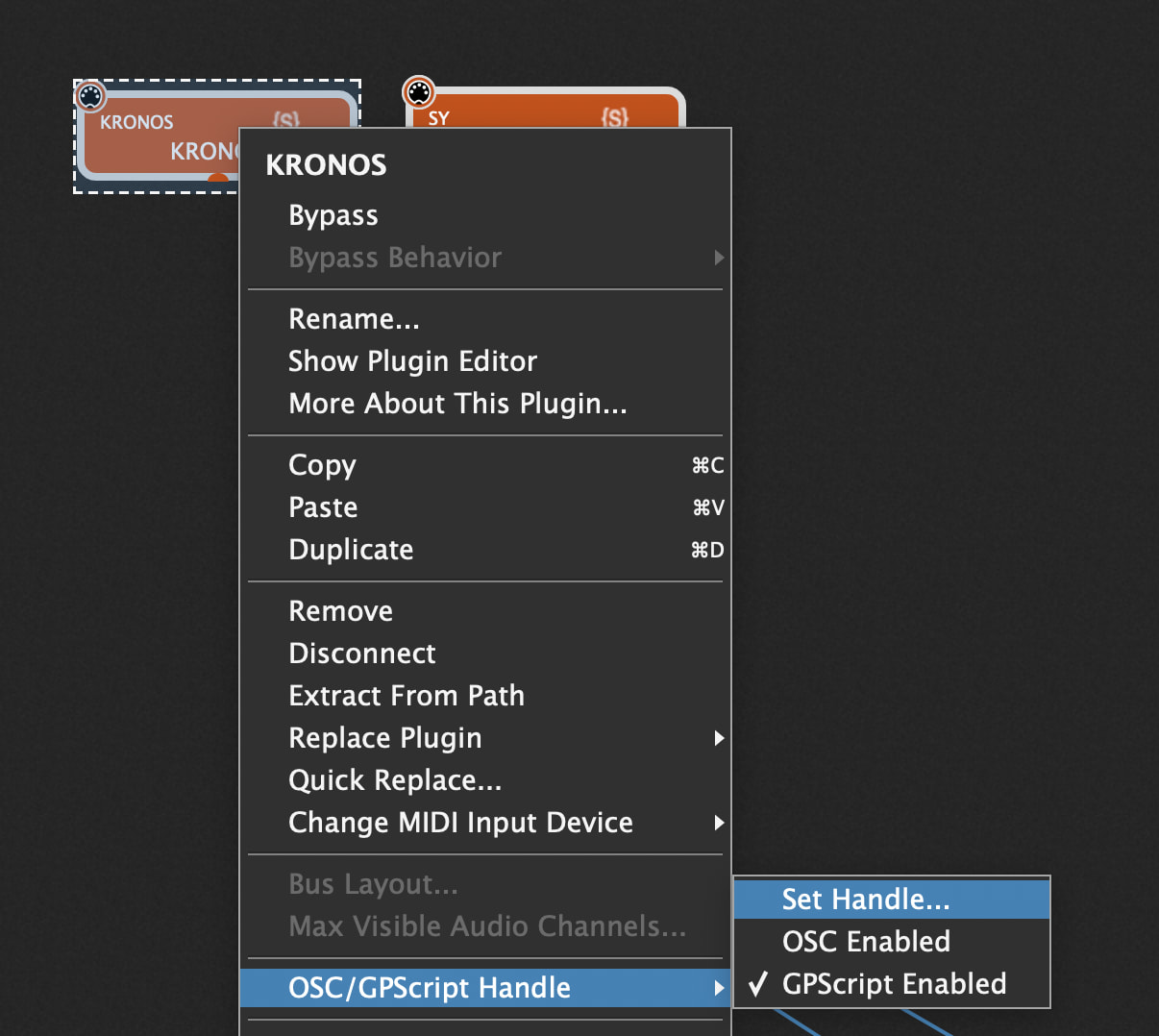
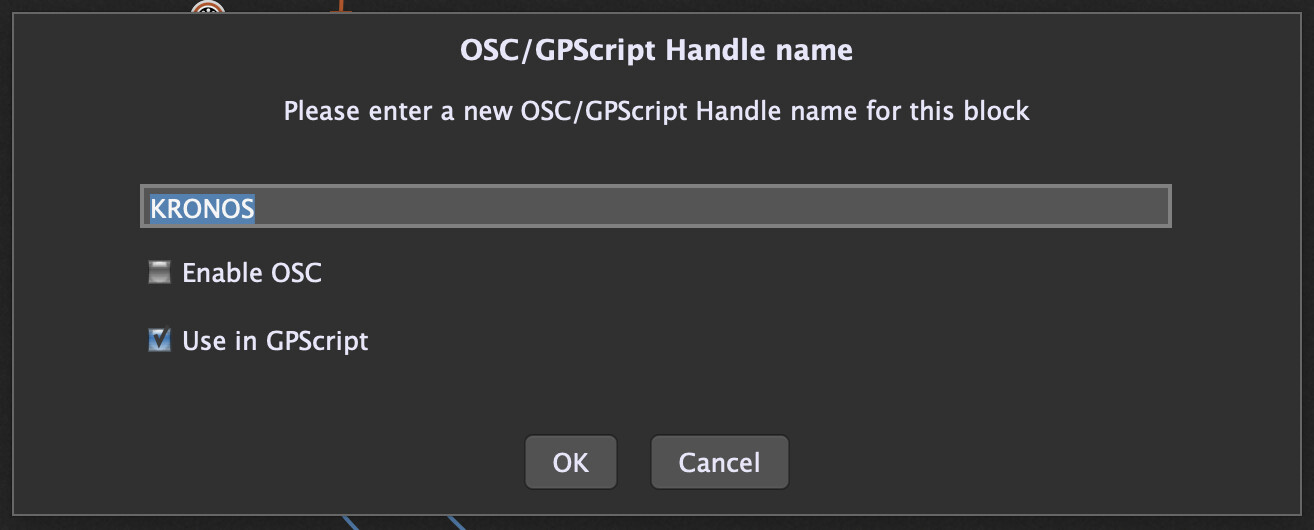
I’m so sorry. Understand it now.
This will do the trick.
Thanks a lot, Paul!