Hi there
I’ve started to use GP with guitar  and a few modelling plugins - S-Gear, Line6 Native, and Neural Plini. I’m enjoying the range of tones available and how realistic these plugins are. BUT… there is a ‘fizziness’ to the sound that isn’t present when plugging into my pal’s Line6 hardware.
I’ve watched a few videos about setting input gain correctly, which I think I’ve followed. I’m using a Focusrite 4i4 with the gain knob set to zero, and the PAD button enabled, but the fizziness remains. Someone said that the hardware-based modellers have special impedance circuits which fixes this, which I assume my audio interface does not.
I was wondering if using a DI box before the interface might improve things, so am keen to know if anyone here has experimented with that.
Thanks!
Might just need a bit of top end EQ or maybe use an IR or cab sim to tame the top end.
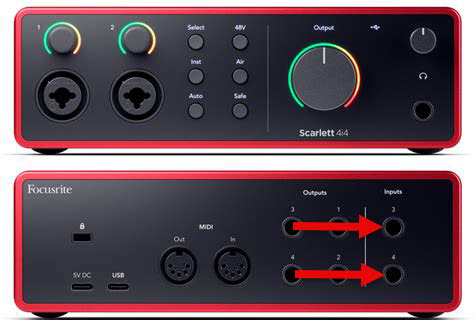
Are you plugging the Plini into Input 3 or Input 4 configured for an Instrument? On an amp, modelers should be plugged into the FX Return, not the Instrument input. Try switching the input to Line impedance.
EDIT: Sorry. Wasn’t paying attention. Archetype: Plini X is a plugin. So, never mind.
EDIT 2: Do you have the Inst button activated?
EDIT 3: I don’t want to ask the obvious, but I assume that you’re using either Input 3 or Input 4 on the back of the 4i4, and not one of the two inputs on the front (Mic/Line).
I may not be a guitarist, but in every band, I constantly have to solve problems like this for the guitarists—“because a keyboardist is supposed to know that.”

Check my EDIT. Plini is a plugin and not a modeler.
@jwdnty Does your guitar have a preamp or is it passive?
EDIT: I’ve got a sick dog I’ve been dealing with and probably should not be trying to “help” when I’m so distracted. He’s 15 and I’m nervous.
Thanks for the replies folks. A few answers to questions asked:
My Schecter Reaper-6 uses passive humbuckers, one of which can be split - which I tend to use a lot.
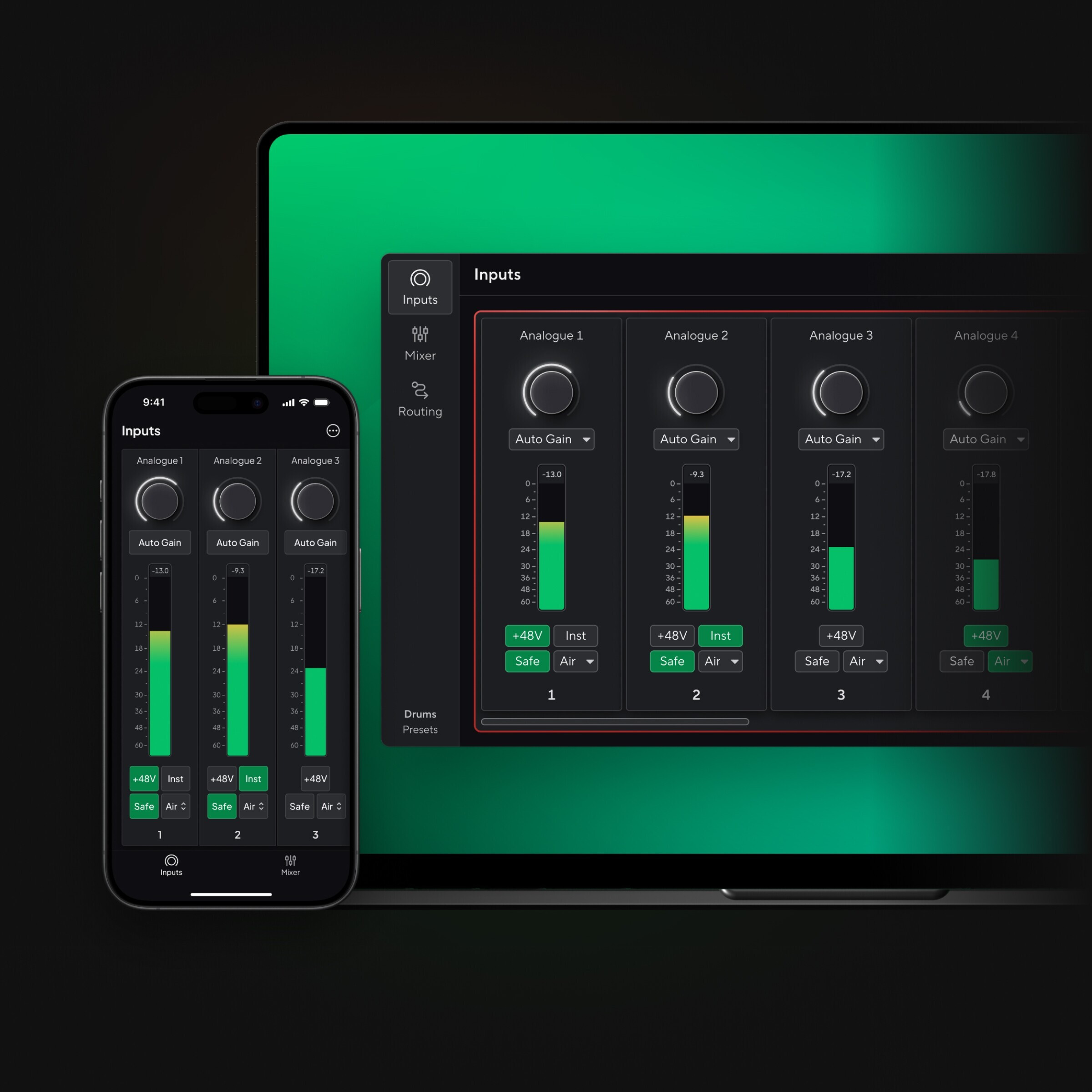
INST is enabled, and does bring the gain down which helps the fizz, but not quite as much as I’d like.
I’m plugged into one of the inputs on the front, with the gain set to zero, but plugging into 3 or 4 on the back doesn’t seem to change anything - should it?
There is nothing between my guitar and the Focusrite, other than the TS cable connecting the two.
EQ does help, perhaps I should persevere with that?
My input db range in the plugin is between -20 and -12db - ish.
I really dont think it’s a Gain issue. If using humbuckers which tend to be slightly dirty hen I think this is what you are hearing a lot clearer than with a hardware rig. Without a cab to tame the output you are probably hearing your guitar full range, a bit like if using a FRFR cab.
At least, this is my experience.
I think you’re absolutely right @Dave_bass5. I’m also monitoring this through a pair of Genelec 8030s, which will be full range.
So I think your initial suggestion is worth a try.
Maybe the monitor or display of your computer causes the noise (a Line 6 hardware doesn’t have such!)… when i play in front of my screen, there is always lots of unwanted noise. Most of the time it helps to
a) move away from the screen and/or
b) turn the guitar neck so that it points 90° from the screen (less “targetable surface” for interference radiation)
Maybe that helps.
It absolutely does @schamass, mainly when I’m using the split coil as you would expect. Kinda frustrating when you want to be near your monitor when designing sounds!
That’s the downside of the software/computer world.
Your guitar works like an antenna for the smallest amount of electromagnetic radiation… unfortunately all (most?) displays emit electromagnetic noise. Maybe there might be “noise-optimized” displays available too… i don’t actually know.
I think there would be a huge market for such devices…
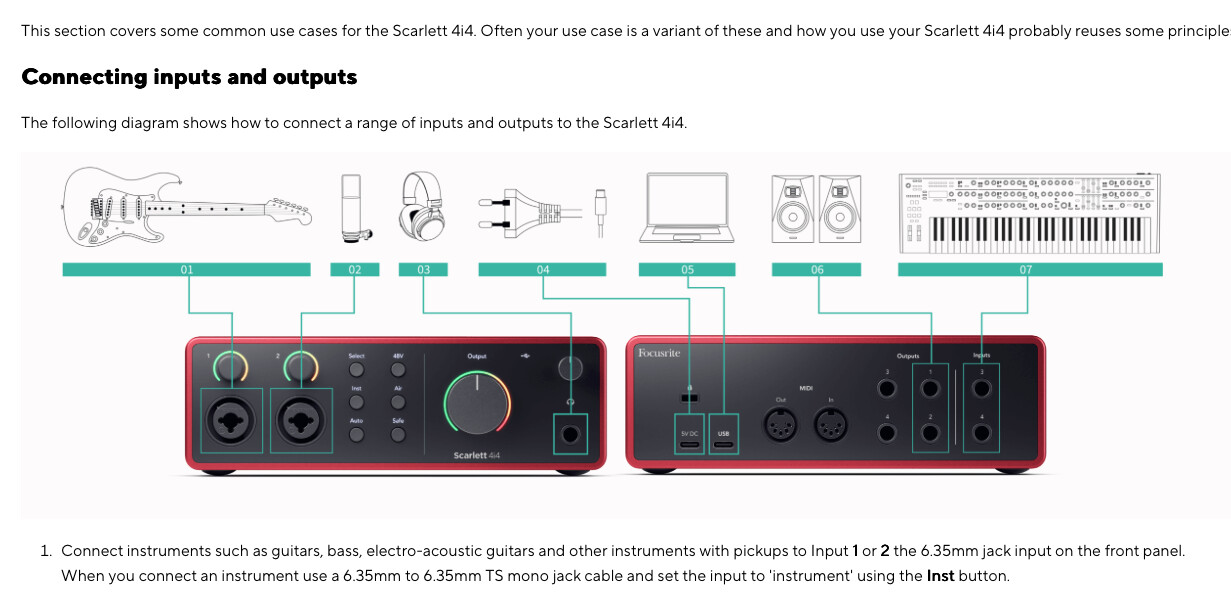
There’s definitely a problem when plugged into the front. You have an impedance mismatch. The combo jacks on the front are Inputs 1 and 2. The outer XLR female jack is for a microphones. The inner 1/4” female jack is for a Line level signal, like the output of hardware modeler or an electric piano, for example. No selector button is needed. The mic preamp is only connected to the XLR jack. The Inst(rument) button has ZERO effect on Inputs 1 and 2. You need to connect your guitar to either Input 3 or Input 4 on the back panel next to the Main Outputs (1 and 2). The Inst button switches those 2 inputs between Instrument and Line levels.
Are you saying that when you plug your guitar into either Input 3 or 4 on the back AND you have activated the Inst button on the front, you still have exactly the same problem?
Do you have the same problem with a different guitar or a bass?
Is AutoGain enabled in Focusrite Control 2 (the default, IIRC)? If so, disable it. Note that you can also enable INST in Focusrite Control 2.
If you don’t have it, you can download the 4i4 4th gen PDF user guide from the Documentation section on this page.
4th gen 4i4 user guides and software downloads
That’s not what the manual says. In fact quite the opposite.
Not sure if relevant, by my 4i4 is 3rd gen. Things may have changed when they updated?
Front inputs have always been fine for instruments.
I have the Schecter-classic-ea-whatever. It also features splittable pickups. When split they are rather noisy. I guess they’re rather sensitive to (digital) hum. I also use it directly injected to (in my case) a behringer umc1820. I don’t think a di will be helpful, but I can try it out next Sunday.
It is a pity these pickups are this noisy: apart from this they sound great when split 
If you press the ‘inst’ button the 1/4” become hi-z, at least that was case for the 3rd gen (I had a 4i4 3rd gen, until it fried itself).
I believe there are some workarounds - soldering a resistor for example. But I think if they were any good, the manufacturer would fit them by default.