As I already have some minor mess with all the presets I did in the past for various plugins I’m wondering if there’s already a guide out how to get this structured better.
On one hand I do my own presets and save them within the plugin, on the other I also do GP presets with the saved states of plugins
Besides this I have of course backups in time machine of my two Macs. However syncing only presets with the plugin internal functions is time consuming and you always forget something.
I also remember my first mac replacement some years ago which was quite time consuming to get things sorted out. Meanwhile my personal preset collections has grown and I think also needs some care…
So how do you guys handle this in the Mac world? Or even worse, in a mixed world of mac and Windows?
I started with an overview based on some questions to ChatGPT and lookup some locations on my SSDs…
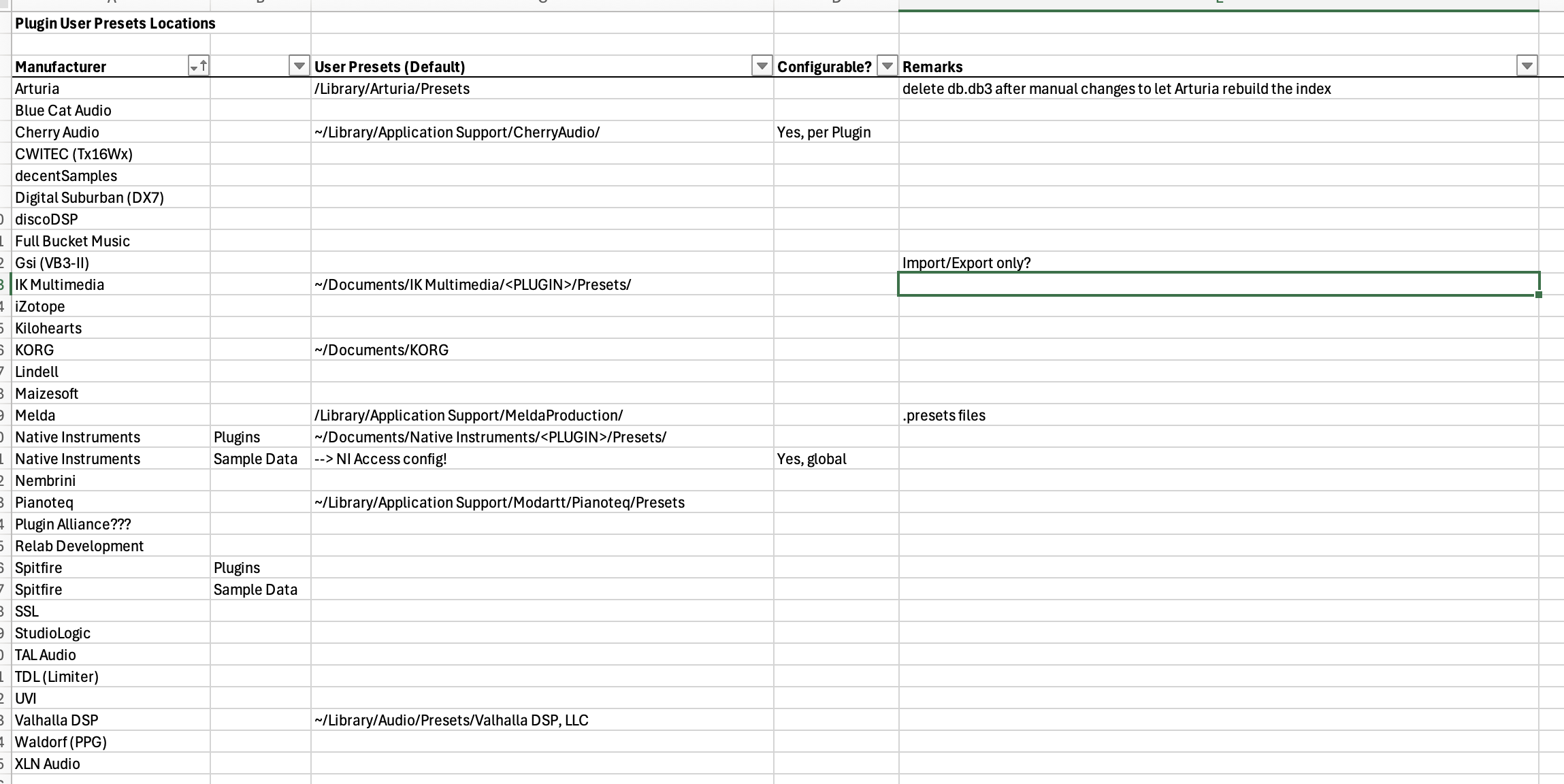
First findings:
- there’s no place like home

- some manufacturers moved the locations over time, or leave empty folder structures (e.g. Arturia: everything now in /Library/Arturia empty folders in ~/Library/Audio/Prestes/Arturia …)
- for some I have seen only import/export so far
My goal: write something like a sync script to keep my macs in sync and have an additional backup.
BBB
PS: GP presets only is not sufficient for me, as I also use these plugin presets in my DAW (Logic)…