I wonder, as a matter of understanding, is there another function I could use in the gig script that would send the count-in MIDI directly into the drum plugin.
IOW, can I address a plugin block by name or handle directly from the gig script?
I don’t think I see a function that offers this, but I would like to confirm. Thanks.
Since I don’t understand these answers, I probably didn’t put my question across clearly.
Let me try again …
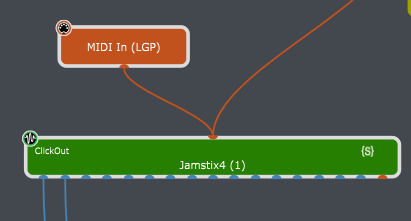
The green plugin block in the above picture has the caption/name of “Jamstix4 (1)”, and it has the handle of “ClickOut”.
Is there a line of code (i.e. a function call) that I can use in a script that will send a specified MIDI message from the script directly into the MIDI input of that green box?
IOW, not thru a wire or some other intermediate entity.
(If available, I would use such in the On Timeline() callback in a manner similar to the discussions already above.)
If such exists, and there are limitations on which kind of script I could use it in, then OK, important to note that. But the essence of my question is does the function exist, and if so, what is it? Thanks.
Maybe - not sure - but I can (sort of ) see the benefit of not having to require a MIDI In block for such things — but I’m not sure how many would benefit from it
And that would be one problem, though I suppose we could make the MIDI input port of the plugin flash by itself
But the real question is whether it would be worth doing this at all - how many would use such a feature?
That said, forget about GPScript for a minute – it might be very convenient to be able to send MIDI messages directly to a plugin from actions.
You do not need the timeline callback to generate a countdown. Even from a scriptlet, you could query the current BPM, convert to milliseconds and then use SendNow and SendLater in a single call to generate MIDI note messages that would be sent out over time.
OP you did not specifically say that you need the play head running. As @dhj points out, if all you are looking for is a count in for your band/recording this simple solution is not locked to the Beats/Bars, but is a simple countoff at the BPM (mS intervals). As it generates Audio from the drum plugin so it can be recorded.
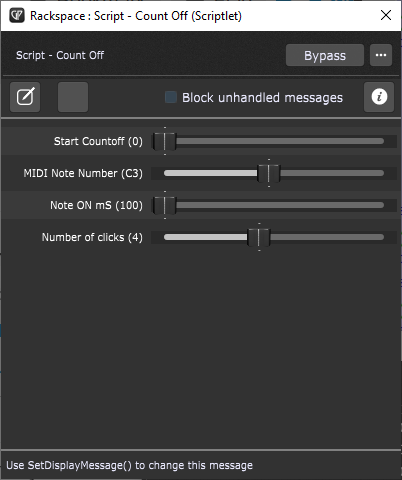
A number of parameters are exposed to allow configuration without changing the code. This scriptlet will also obey the BPM overrides provided in the Rackspace or Song parameters.
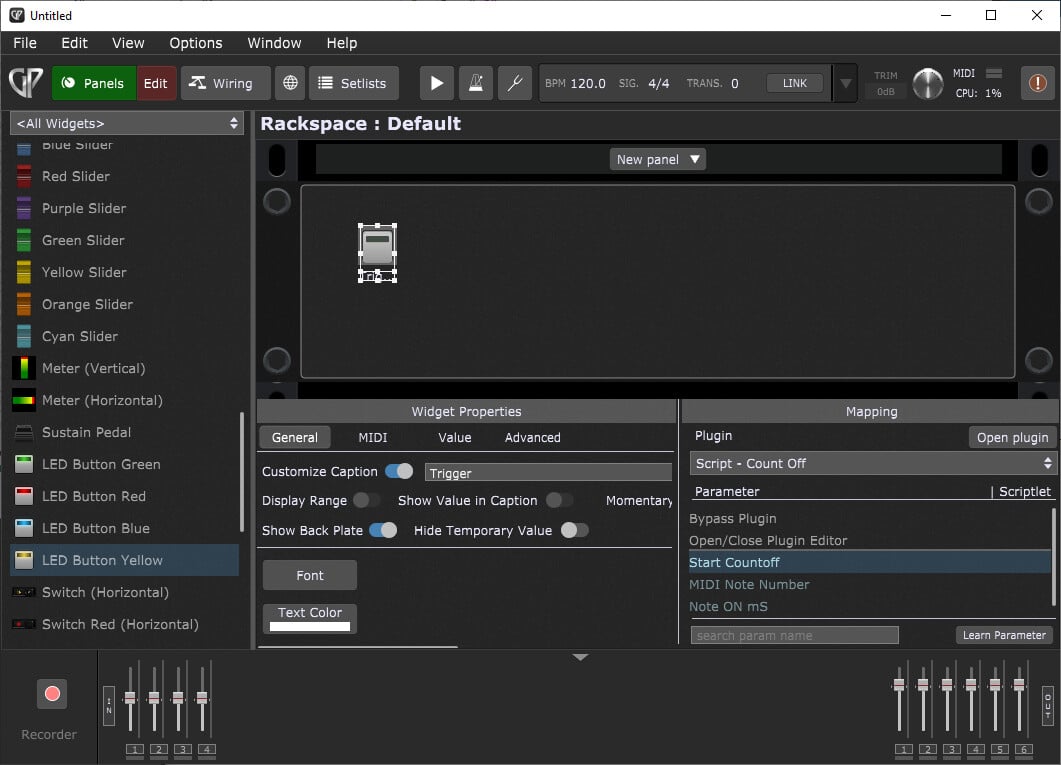
To trigger the count, the Start Countoff parameter can be mapped to a widget as below. This widget can then be mapped to a physical control, via the Rig Manager.
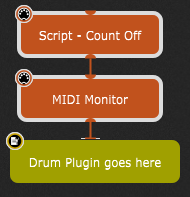
Here is the scriptlet that should output MIDI for the Drum Plugin. The defaults can be changed in the const DEFAULT_ section of the script, if external control is not needed.
// Count in scriptlet
// The BPM value is taken from the Global BPM
// Rackspace and Song overides temporarily set the Global BPM so these are collected at the moment the trigger fires

const DEFAULT_CHANNEL : Integer = 10
const DEFAULT_NOTE : String = "C3"
const DEFAULT_VELOCITY : Integer = 100
const DEFAULT_mS : Integer = 100
const DEFAULT_COUNT : Integer = 4

var
    start ("Start Countoff") : Subrange Parameter 0..1 = 0
    note ("MIDI Note Number") : Parameter AsNoteNames C-2..G8 = DEFAULT_NOTE
    duration ("Note ON mS") : Subrange Parameter 100..200 = DEFAULT_mS
    clicks ("Number of clicks") : Subrange Parameter 1..8 = DEFAULT_COUNT

var clickNote : NoteMessage

// --------------------------------------------------
// Called when a parameter value has changed
On ParameterValueChanged matching start
    var n : Integer
    var r : Integer = 0
    Var i : Double = 60000.0 / GetBPM()   // Calculate the interval in mS from the BPM

    If start <> 0 Then
        SendNow(clickNote)
        SendLater(clickNote.WithVelocity(0),duration)
        For n=1; n<clicks; n=n+1 Do
            r = Round(i*n)
            SendLater(clickNote,r)
            SendLater(clickNote.WithVelocity(0),r+duration)
        End
    End
End

// --------------------------------------------------
// Called when a parameter value has changed
On ParameterValueChanged matching note
    clickNote = MakeNoteMessageEx(NoteNameToNoteNumber(note),DEFAULT_VELOCITY,DEFAULT_CHANNEL)
End

// --------------------------------------------------
// Called automatically after script is loaded
Initialization
    clickNote = MakeNoteMessageEx(NoteNameToNoteNumber(note),DEFAULT_VELOCITY,DEFAULT_CHANNEL)
End
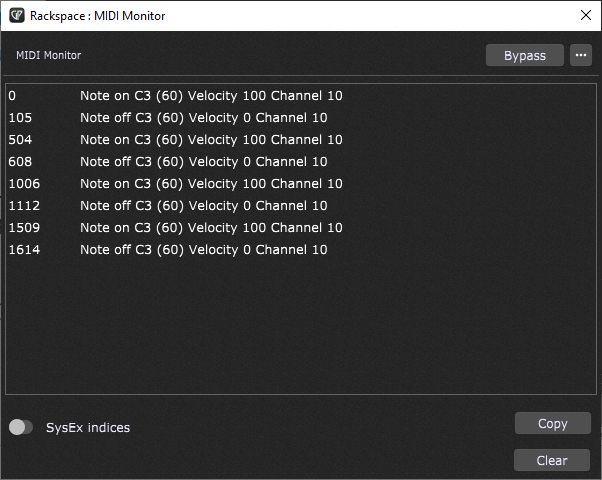
This is the output trace from the default settings using 120BPM
// Called on attempt to change playhead status - (Rackspace and GigScript only)
On SystemEvent(newValue : double) Matching PlayheadStateChanged
    OSC_SendDoubleSpecific("/Start/SetValue", newValue, "127.0.0.1", 9000)
End
Adjust the port number 9000 to your OSC listening port.
Create a widget and give it the OSC/GSScript Handle Start
Enable OSC
Map a scriptlet Parameter to that widget
and in your scriptlet react on Parameter changes.
This way you trigger the scriptlet by pressing the global play button.