If you don’t need to use predictive loading and are using multiple rackspaces and variations and your program changes are just selecting which rackspace or songpart, then change is instant….you can be in the middle of a bar and switch sounds with no glitches
Hi Xandal and welcome to the community forum! 
I saw your thread in the Musiker Board forum.
Hello!
After a few months, I have to bring this post up again. Unfortunately, it’s only been in the last few weeks that I’ve been able to get to grips with Gig Performer and now I’ve added your script! It’s really great!
I played a little test gig with it last weekend - everything worked just as I wanted it to!
Thanks again for your help! 
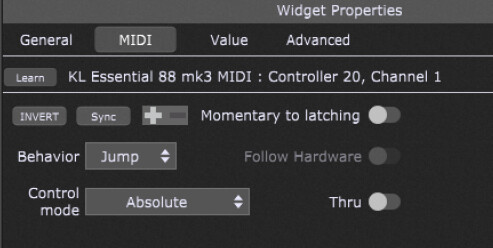
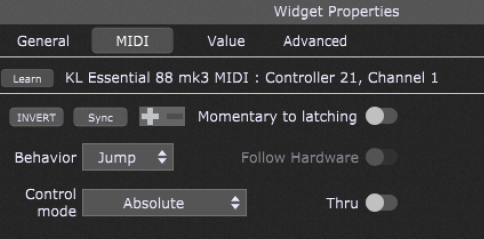
However, I still have a problem with correctly assigning the “Go” and “Delete” buttons with a midi command. I use the Arturia KeyLab Essential 88 mk3 and I would like to assign these two functions to the “Play” button and “Stop” button.
However, I always have to press them twice for the function to be executed. What could be the problem here? It would be great if someone could help me! Thx a lot!
Here are my settings:
“Delete Button”:
“Stop-Button”:
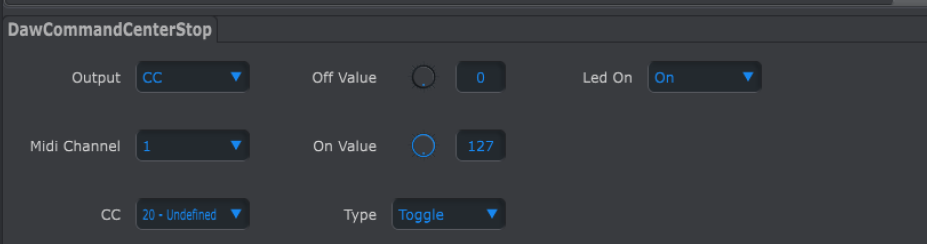
Here are the settings of the Arturia Midi Control software:
“Delete-Button”
“Play-Button”
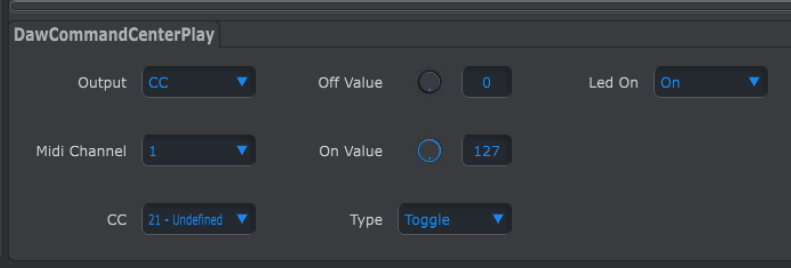
It looks like those Arturia buttons are set up in Toggle mode, which means in the first press the value sent will be 127 and on the next press the value sent will be 0. When you Learn the MIDI controller to the widget in GP, only one of those values is the one that will activate the widget. That is why it is only activating on every other press.
See what happens when you change the Type field in the Arturia Midi Control and re-learn the widget.