I just read this and I’m not 100 % sure my answer below is what you were looking for.
You most certainly don’t need further scripting. The solution depends on where your scripts and the other VSTs are. Let’s pretend they are both in the global rackspace.
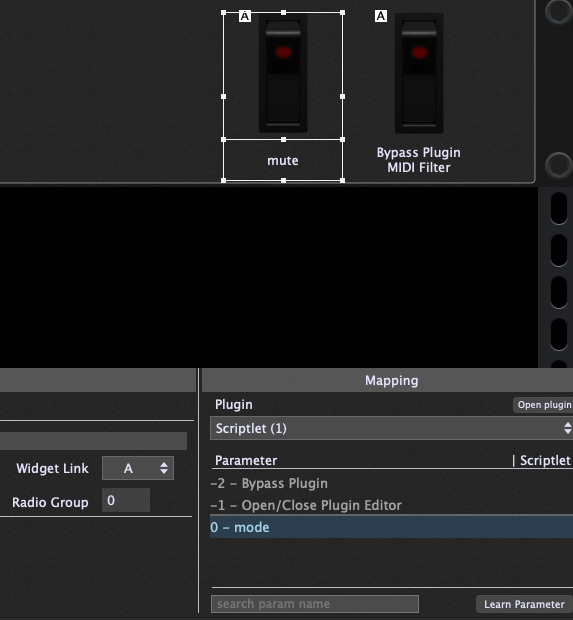
You assign a widget to the mode switch. Everytime you flip it, the assigned scriplet either mutes your drawbars or sends out the last saved positions.
With the “Widget Link” (bottom left) you can link this widget to a separate one that toggles the bypass of another VST or midi filter, for example.
Depending on your needs you might also want to mute stuff in local rackspaces. In this case you can “remote control” the widget on the global rackspace panel that controls your drawbar scriptlet from a widget in the local rackspace.
Here you find the documentation on that: How to control widgets from the Global rackspace in a regular rackspace?
This is especially useful since you could save the individual mute state of both your other VSTs and the drawbars within variations and rackspaces.
Thanks for more excellent suggestions! Just after I posted I worked out how to put switches into a radio group which does what I need here, but widget links look a lot more powerful and I can see myself needing them later.
So I’m almost there, I had a few of the numa’s midi quirks to work around but it’s all pretty much working now. One last hurdle is, the clav VST I’m switching to is hearing the CC messages and winding up muted when I switch to it (all the tone switches set to off)! I think that should be easy to fix with another midi filter in front of the clav section.