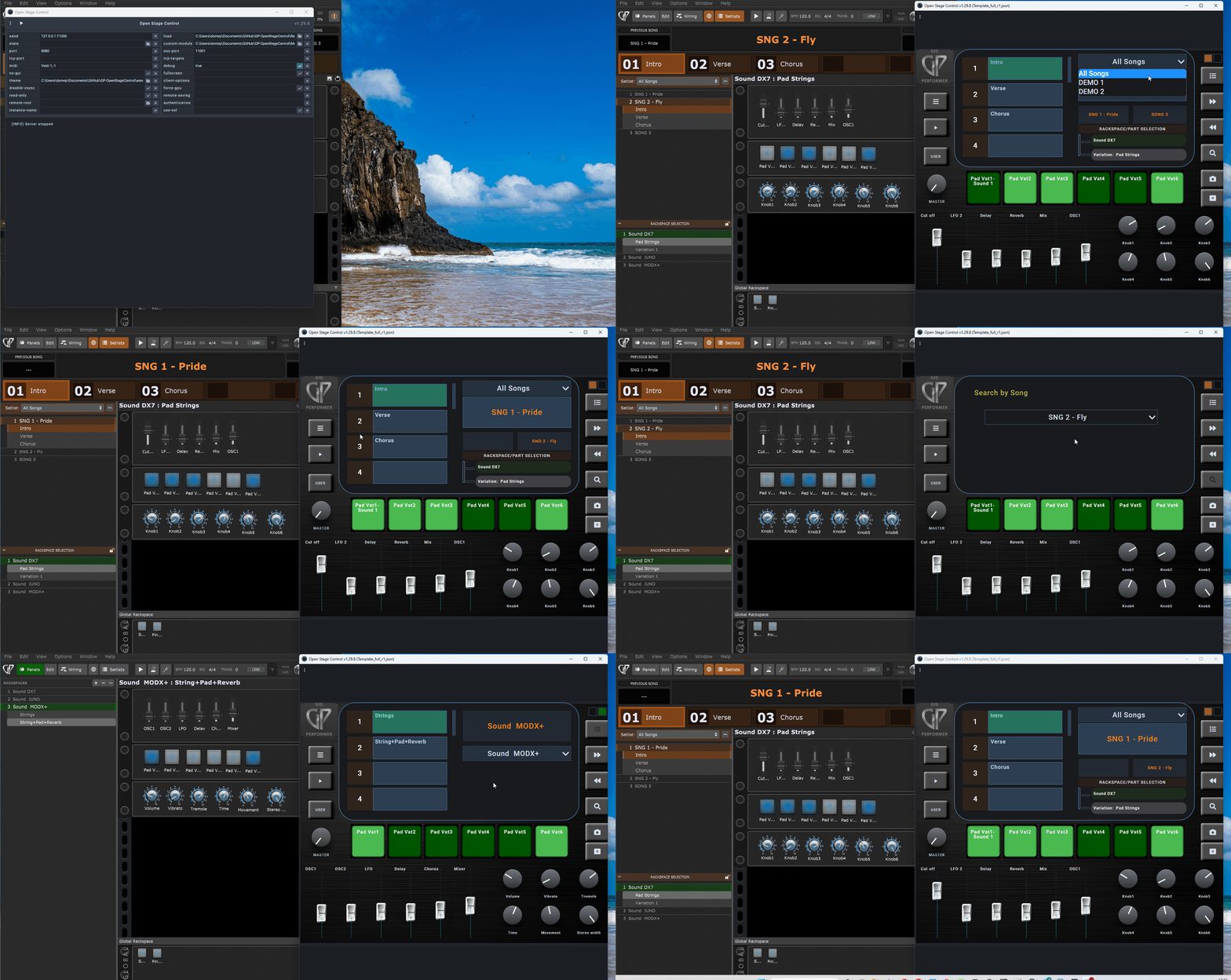
I’ve created a collection of custom Open Stage Control templates designed specifically for Gig Performer users who want to build their own touch-based OSC control surfaces.
Why Open Stage Control?
After experimenting with other solutions like TouchOSC, I chose Open Stage Control mainly because of:
Its portability (runs on Windows, macOS, Linux, or Raspberry Pi)
The use of web technology (HTML, CSS, and JavaScript)
Being completely open-source and highly extensible
A large number of ready-made widgets and controls
The ability to build custom behaviors and scripts with JavaScript
In short, Open Stage Control offers a flexible, cross-platform environment that perfectly integrates with Gig Performer’s OSC features.
A Few Limitations
That said, Open Stage Control still has some aspects to be aware of:
Limited documentation and examples —
For newcomers, it can take time to understand how OSC messaging and modular scripting work.
Requires some technical background —
Those unfamiliar with web-based architectures or OSC concepts might find the initial setup a bit confusing.
These templates allow you to:
Control rackspaces, variations, and song parts in real time
Display lists dynamically (rackspace and variation names)
Synchronize bidirectional OSC messages
Customize the interface for different screen sizes (desktop, 5" display, smartphone)
Apply custom themes and modules
However, once you understand the logic behind it, it becomes an extremely powerful and flexible tool — perfect for integrating with Gig Performer.
Available layouts:
Template_full_r1 → for desktop or tablet (10”+)
Template_tiny_r1 → optimized for 5” Raspberry Pi displays
Template_Portrait_r1 → portrait layout for smartphones
Includes
Custom module (setlist.js) with full OSC communication logic
Helper scripts for Gig Performer (to generate dynamic lists)
Ready-to-use configuration examples
Themes and CSS styles for visual customization
The templates are still a work in progress — a few small fixes and refinements are planned for future updates.
Despite that, they can already be used for testing or as a starting point to build your own customized layouts.
Please note:
There are few ready-made examples, which might make the first setup a bit challenging.
Users without experience in OSC or web-based control architectures may need some time to understand the logic behind the system.
Once you get familiar with it, Open Stage Control proves to be a very flexible and powerful platform for integrating with Gig Performer.
For setup details, screenshots, and full documentation, check the GitHub repository below
Nice work. I’ve been working with OSC for over ten years now, and I’m pretty sure it stands for “Open Sound Control”. That being said, I agree, it is a very powerful platform for GUI setups.
Understood. So Open Stage Control is a platform by which one can design OSC GUI’s, correct. Unfortunately I don’t have extensive experience in coding, although I have dabbled. Most of my OSC experience was in using the Application Max, by cycling 74. With it, I was able to network several audio hardware devices and computers on a live stage. I also used an iOS app called TouchOSC for an iPad control surface with the whole thing. Unfortunately, TouchOSC uses specific screen controls, but I gather that your method allows much more freedom in how your controls look and behave.
This looks very cool, and although I don’t see myself using it as presented it looks like you’re doing some things that I can probably borrow and use in other applications.
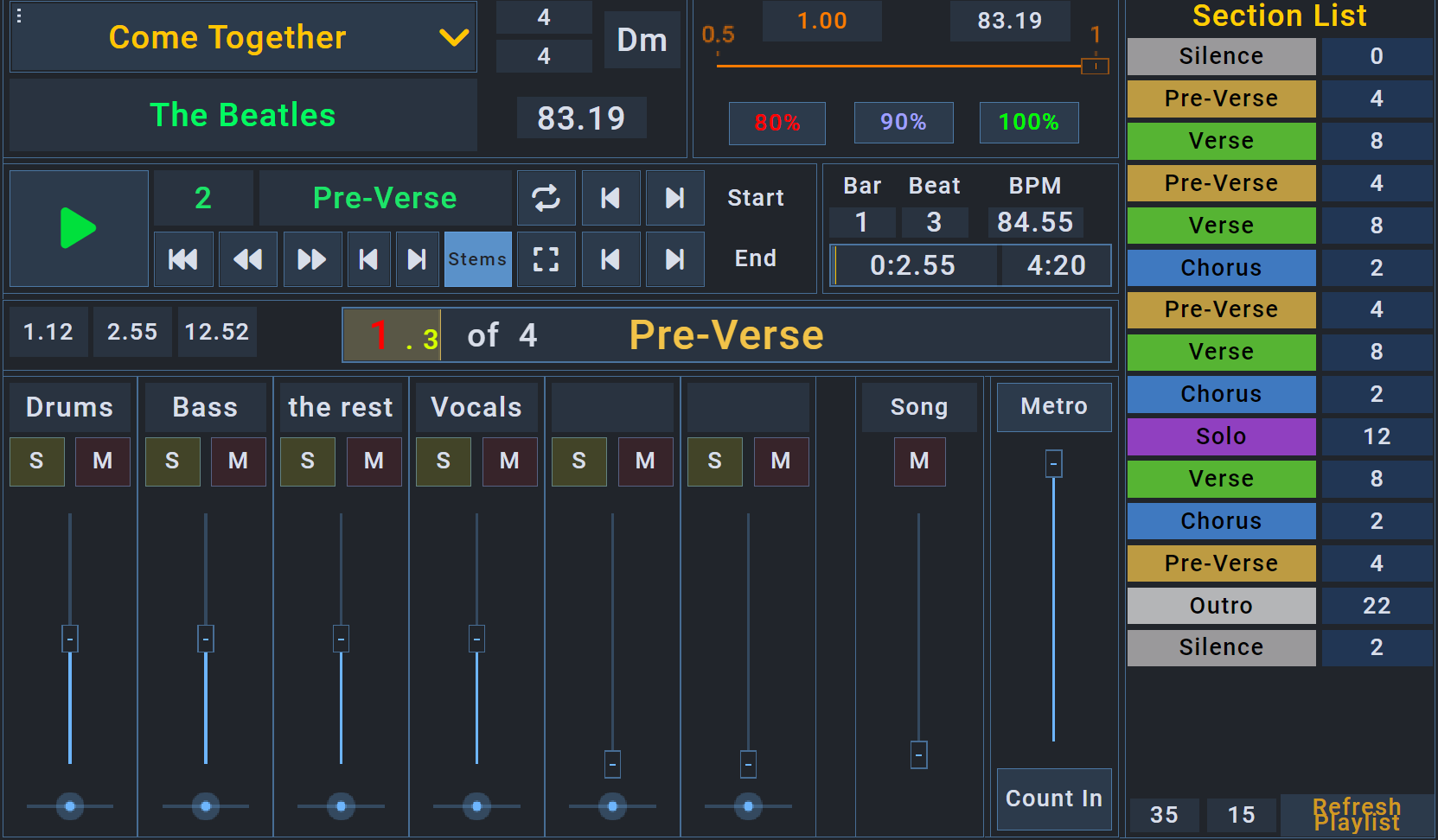
Here’s an image of an Open Stage Control UI that I put together for controlling SongMaster Pro for learning songs. In here I have a much more primitive way of building the Song list and the Section list that works, but is one of those things that just bothers me because I know there’s a more elegant, concise, and flexible way to do it but I don’t really know JS so my code is ugly. I see what you’re doing, and I’ll probably shamelessly copy it at some point, so thank you for that.
The other thing I want to do is make it so OSC talks to GP and SongMaster at the same time, so I can adjust volume levels independently and select GP rackspaces independently from SongMaster songs and songparts. I was planning on doing that with different tabs, but it looks interesting how you did something similar with different layers.
Your template is cool!
That’s what the community is for: sharing resources, helping each other, and suggesting new ideas. I also use a lot of things shared in the community, and it’s a great thing.
Honestly, I’m not an expert programmer in these languages, but there is a lot of documentation for JS/CSS/HTML, so with a little effort and the use of AI, you can achieve your goals.
If you’ve seen OSC, there are many interesting components. I mainly used the ‘panel’ component to build the layout.
I’m not an expert, but if I can, I can help with what I’ve done.
 However, once you understand the logic behind it, it becomes an extremely powerful and flexible tool — perfect for integrating with Gig Performer.