Variations affect widget values only.
Variations affect widget values only.
Variations affect widget values only.
Those should be the first 3 lines in the Variations section of the manual. 
Variations affect widget values only.
Variations affect widget values only.
Variations affect widget values only.
Those should be the first 3 lines in the Variations section of the manual.
Thanks! That`s excatly what Im discovering. By the way, I made a session with 5 sample based and soft synths and works great, even with Patch persistance. Thank you
I use IK with their LESLIE add-on on my i9 MacBook Pro with WAVES SSL G CHANNEL eq and comp and the GP CPU reads at most 34%.. (Just a piece of data)
How many rackspaces with Keyscape do you have loaded simultaneously? I’m just trying to figure out if Keyscape is a viable option for me.
One for acoustic grand and one for Rhodes.
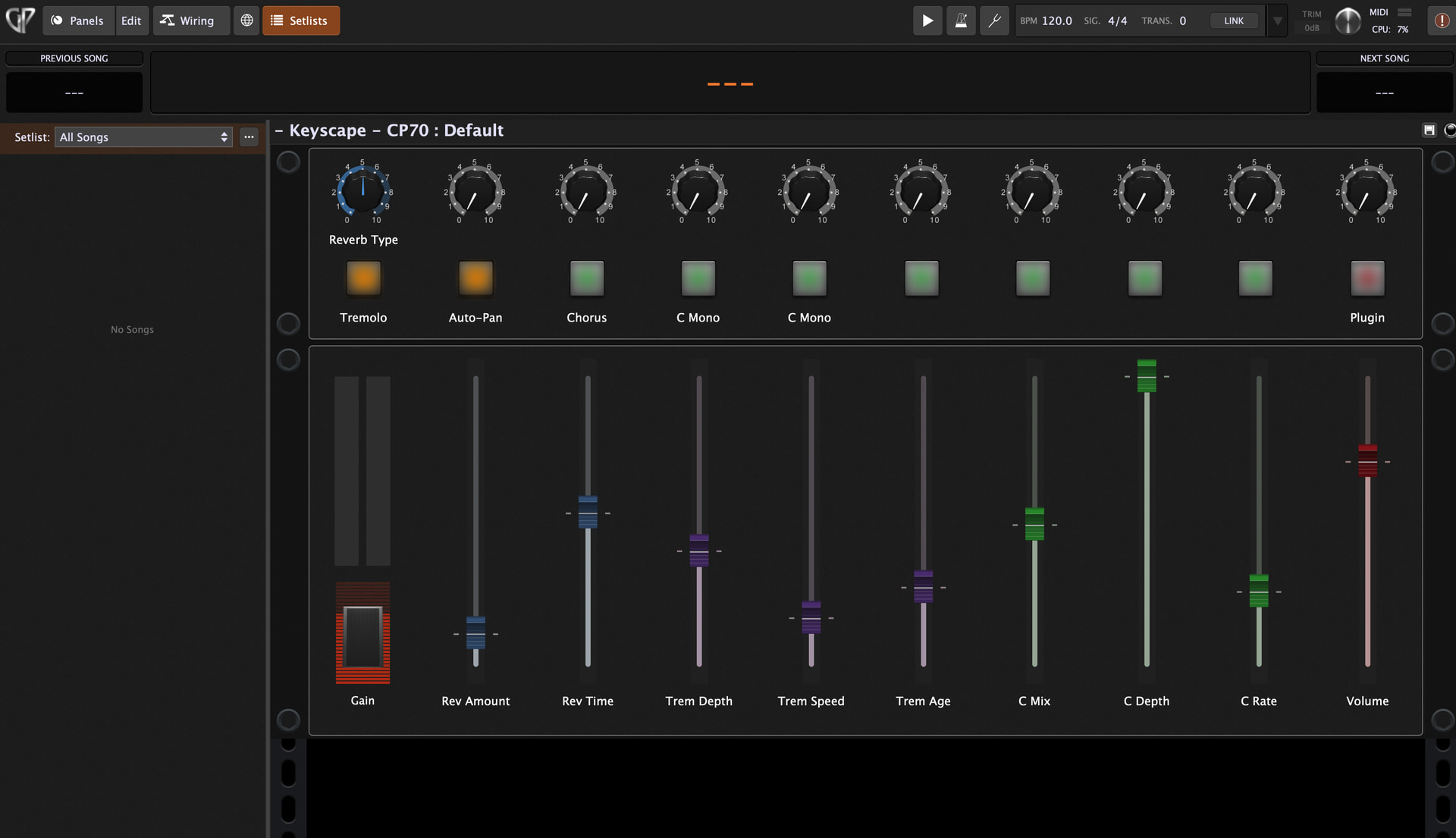
I’ve given up on the global rackspace approach and now use one-song - one-rackspace/song because it’s more portable and suits my requirements better. I’ve created 3 Keyscape based template rackspaces that I use as the basis of any new rackspace that requires Keyscape. I’ve mapped the Keyscape controls to widgets mapped to my Arturia controller as per the screen shot. I’ve done this for CP70, Wurli and Rhodes and have needed 3 rackspaces because of the differences in Keyscape controls. FYI - if I don’t need any actual mapped controls for a given song, I’ll often just drop in a Keyscape plugin without mapping anything.. it all depends :).
I also find the global rackspace approach cumbersome and is about to go the same way. I just gear, that I will get a lot of keyspace instances across different rackspaces because they are often used together with varying other vsts depending on the song. And the memory usage could be very high. Do you experience anything like that?
I’m using a session with just two instances of keyscape and everything runs fine. Also, this instances are solo, no layer. The rest of the rackspaces are soft synths. No sample based. Korg Triton Extreme vst do the job for the rest of the sounds.
The global rackspace was intended to consolidate pre and post effects, and handle I/O for more sophisticated needs.
For example, all my rackspaces feed audio to the global rackspace and I will typically just have limiters or global reverb there and then route final audio to my interface. That last is very handy should we have a show where FoH can’t handle all my outputs (I normally have three stereo pairs, one sub, and an output for click that goes only to band members.
If we have to play at a venue where front of house can’t afford to give me more than four channels, then I can quickly route my three stereo pairs to one output pair rather than having to change every Rackspace.
Similarly, a guitarist may choose to have input arrive at the global Rackspace route input to compression (say) then route the audio to individual rack spaces to get the desired sound effects for each song and ultimately brought the audio back to the global rackspace to go to front of house.
I know the global Rackspace supports midi and sometimes people will put a synth plug-in (perhaps one that requires a lot of resources) that they use all the time into the global Rackspace, but I’ve never done that myself. In any case if I had a resource issue like that, I would rather put that plug-in in a separate instance.
I know the Global Rackspace was intended for the purpose dhj mentions.
For what its worth, I think it also provides an important function to control ram use. If you are using the same (especially sample heavy) plugin with the same “sound” (Let’s say go to Kontakt Session Horns section), I am pretty sure you use up much more ram if you put the plugin/sound in multiple rackspaces as compared to putting it in your Global Rackspace once.
So, although the Global Rackspace was not intended to aid in this issue (ram use of sample based plugins), I think it is a useful option for this purpose.
Thank you for the explanation. But I’m curious. What does it help to put the RAM hungry VST in another instance? I mean, it is still using memory from the same machine…
Actually, by resources, I was thinking more about CPU than RAM. When you create a separate instance, the audio thread will generally use a different core.
Also, as far as RAM is concerned, remember that if you create three instances of a synth plugin, the code for that synth is not loaded three times - only the data that differentiates one instance from another has to be loaded separately
Ahh. Clever. So if i use Keyscape in several rackspaces, the first one will eat a lot of memory, but the rest, not as much.