MSuperLooper is on sale this week until the 22nd of August, or so.
$90 (from $120) at MeldaProduction
MSuperLooper at MP
$79.21 at JRR with code: FORUM
MSuperLooper at JRR
MSuperLooper is on sale this week until the 22nd of August, or so.
$90 (from $120) at MeldaProduction
MSuperLooper at MP
$79.21 at JRR with code: FORUM
MSuperLooper at JRR
Did you ever try Zen Audio ALK2 ?
Hey rank13 and ztones, I’m glad I found this thread, as I was just about to give up on superlooper in GP due to lack of feedback. I’m also not a fan of opening up the plug-in UI, so what you’ve built here is exactly what I was looking for! Any chance you could share the latest script please? Thank you!
Hi @johan_rohan. I’ll revisit this. I worked through a number of changes with @ztones, and he will be best placed to advise whether he’s found it useful and whether there were any issues.
The script ended up quite complex. The moving progress bars are a bit of a hack, and use up quite a lot of cpu as GP is forced to redraw the UI. So it comes with caveats….
It is most certainly useable, great scripting work, but to tell you the truth, I’ve been in an extremely busy 5pc band for the last year or so, where there is no need for looping and thus i haven’t had the opportunity to play with it lately.
Mine is in the global rackspace and I could decipher which portions belong to the looper script, but to be honest I’m not even sure if I have the absolute latest version of it.
I thought the script was in the scripts category of this forum but i couldn’t find it. Do you have it uploaded anywhere @rank13? If not, I’ll give it a go…
Thanks guys, if either of you have a link to the script I’d greatly appreciate it. I can test it and let you know how I get on! Thanks again
Is this your script? MSuperLooper: momentary widgets to show state of loops - #22 by rank13
–
I agree that this is a nice candidate for Gig and Rackspace files 
It’s had a large number of changes since then. I’ll review it this weekend
@rank13 I discovered what may be a bug based on the last version of the posted code.
Under OnParameterValueChanged you have the same following line checking the value of the parameter in order to detect which track and loop is selected respectively.
selected = StringToInt(GetParameterText(MSL,parameterNumber))-1
This will always return a -1 or 0 (for the max value). I have suggestions below to fix.
This works for the track:
selected = Round(StringToDouble(GetParameterText(MSL,parameterNumber))*16)
And this works for the loop:
selected = Round(StringToDouble(GetParameterText(MSL,parameterNumber))*3)
I won’t answer you instead of @rank13, but I just wanted to welcome you to the GP community forum. It’s always nice to have one more GPScripter 
Hi, this is my first post on the forum. i am on the trial version of GP 4.5
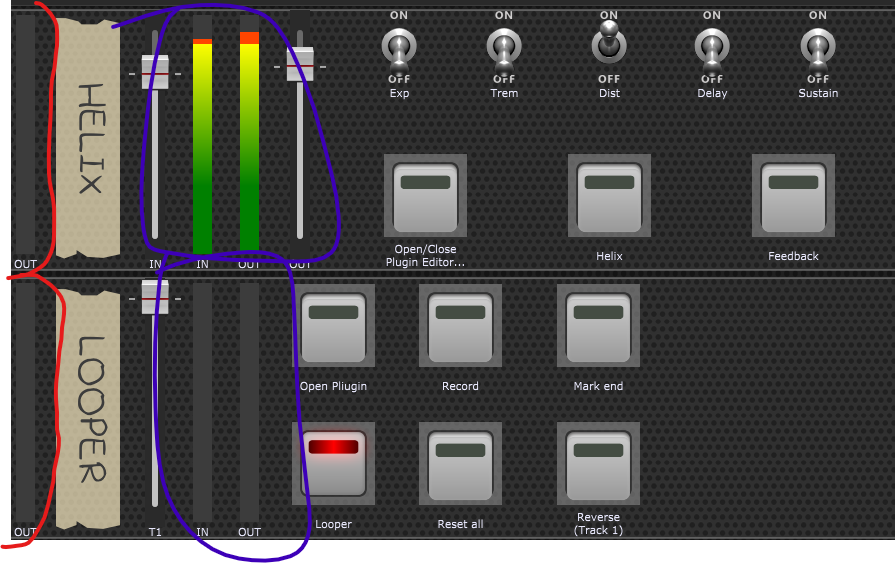
I have set up a gig with some widgets using Helix native and Msuperlooper.
I have notice in yuor comment and also by testing that if i want to “monitor” the in and out of the audio, i need to set a virtual mixer.
My question is, why the “meter” widget does not work dinamycally when is link to the audio in and out of the helix and the looper plug in? They are added to the rackspace but the are frozen and do not change at all.
I am super newbie with GP and also with audio world, so i just ask for an educational reason
Thanks
Welcome.
It is because the meter widgets are “special” and designed to be connected to the gain volume parameter of any of our audio mixer plugins, including the simple gain/balance plugins.
Just insert one of those after your audio input and set it to 0dB. Then you will be able use a meter widget with it. Note that you will probably want to be able to adjust your gain anyway so a virtual mixer plugin is useful anyway.
Thank you
I am not a coder, although I may get curious and stick my toe in it. But I was wondering what is the status of this? I am fairly new to GP and MSL and would like to use them both live without having MSL open in screen.
First of all, thank you for this.
Could you maybe write the ascii charcters in pastebin or some where? I can’t seem to find those anywhere …
These are unicode characters that GP is only able to display on MacOS.
EDIT: Windows users can actually get the characters to display. Turn on the option for local fonts in Options > Display, and then use the Lucinda Sans Unicode font for the label widget.
That works! But I think you mean “Lucida …”.
I apologize for not paying close enough attention to the posts on supporting local fonts, but is there anyway to set Lucida Sans Unicode as the default, so I don’t have to change it for each label widget? And, if so, can I change the default size to something that works on my 4K display (from 15 (the current default for the current default font) to 24 for the L.S.U. font)?
Thanks in advance. Merci d’avance. Vielen Dank im Voraus.
I think that was my auto correct I don’t even know a Lucinda!
 <= 5 character minimum
So I’ve updated the posted code to include a position marker bar and a warning loop end Indicator
I tried a few ways around this; First using a timer to store increments, but the callback is asynchronous, so cannot be used.
I then tried using TimeSinceStartup () but again the async timer callback allowed it to drift when trying to reset the Increment
In the end I just used the Timer callback as an event handler and used the TimeSinceStartup to store a free running accumulator which I can store no of loops and loop inc.
I’ve left this running for a few hrs and it seems to stay locked to the Msuperlooper Loop
I only needed one master timer, but it would be fairly trivial to stick some in arrays and have one for each track. I’ve not trapped double overflow but I don’t need the loops to run that long in songs.
hope it helps someone.
the Two extra widgets are MSloopWarn and MSloopPosition.
Guess the same principle can be used for other time tracking Ideas.
Some of the code is included from a OSC Heartbeat I use to link to TouchOSC, please Ignore.
//------ loop timers --------
var loopSetStatus : Boolean = false
var lStart : Double = 0.0
var lTime : Double = 0.0
var lPer : Integer = 0
//-------- Timers ----------------
var myMessage :String
var myMidiMess : MidiMessage
var i:Double = 0
var FlipFlop :Double = 0
Var ClockGen : Ramp
Var LoopProgress : Ramp
Var iTmp :Integer = 0
var lastTstamp : double = 0
var cummTime : Double = 0
// var for loop position
var currTime : double = 0
var lastTime : Double = 0
var aLoops : Double
var nLoops :double
var lInc : Double
// reset position widgets
Function ClrTrkData(TrkNo:integer)
// clear position data
SetWidgetValue(MSloopWarn, 0) // reset warn led
SetWidgetValue(MSloopPosition, 0) // reset position
loopSetStatus = false
End
Initialization
ClrTrkData(0)
SetTimersRunning(false)
SetGeneratorOneShot(ClockGen,false)
SetGeneratorFrequency(ClockGen,1)
EnableGenerator(ClockGen, true)
SetGeneratorOneShot(LoopProgress,false)
SetGeneratorFrequency(LoopProgress,5) // ten per second
EnableGenerator(LoopProgress, true) // start loop timer
SetTimersRunning(true)
End
//-------------------- M SUPERLOOPER --------loop status ---------------------------------------
// Called on Looper reset all
On WidgetValueChanged(nVal : double) from MSloopReset
ClrTrkData(0)
cummTime = 0
End
// Called on track reset
On WidgetValueChanged(nVal : double) from MSloopTrkReset
ClrTrkData(0)
cummTime = 0
End