Works like a charm! This is already so great for full customization, If there was a way to change the default song and song part button colors (dark/light gray) for a “quick and dirty” change for existing setlists, that would be the cherry on top!  Thanks for much for your awesome contribution!
I discovered a “small” bug when putting the “{c: }” formatting directive any place other than by itself on a seperate line.
Putting it at the beginning of the line highlights the entire line:

Putting it in the middle of the line causes the line to disappear entirely. This is what happened to me on last night’s gig. Because it looks fine in the built-in lyrics window, I never thought anything of it. Live I used this extension. Surprise! This is a new song for me, so I had to mumble through some of the lines. LOL

Why would I put it in the middle of the line? I just wanted to highlight a “STOP” reminder b/c we have a cut right at that word.
Yes, that’s right - my code is expecting a comment to be on its own line (same as with other directives).
In my defence, even the official ChordPro app doesn’t support comments within lyrics!  So, well done GP devs for implementing it!
I will take a look, but there may not be a solution for a while.
It’s all good! Minor issue. Still love using this extension! Any chance implementing pinch to zoom in/out for touchscreens?
Hi.
I have just downloaded and installed v1.3.1 from the release page, but I do not see the GPLC_MARKER widget in the global panel it creates.

Nor does it appear in the pop-up
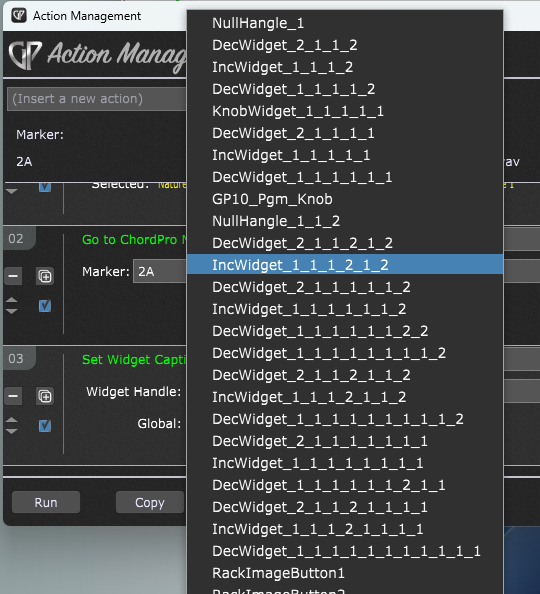
when I try to define the action. (My global widget list is long, but I have checked carefully and GPLC_MARKER is not in the list.)
Can you advise on where to look for it or what to do next, as I would like to make use of this jump capability.
Thanks!
GPLC_MARKER was added to the far right of the global panel. You could try adding another label widget and giving it this handle in the widget properties.

where can the global template panel be found ?
If you go into panel Edit mode, the drop down menu at the top of the screen where you select the panel size, will include an additional menu item for any panels added by extensions.
Hey - thanks man
Hi,
I have a big issu with the extension. I am working since long time with the first vversion, no problem, I replaced it now with the latest one and GP is not starting anymore… the band is coming in 20 minutes.. at home it worked without any problem, what is wrong??
HELP please
Maybe remove it and reinstall the old one?
please send me the old version, I replaced the new with the older and can not find the old…
Go to the GitHub page and all of the prior releases are there. I have no idea which one you were using.
On an aside, it seems to me we spend a lot of time telling people to stop making changes within a few weeks of a show (or even a rehearsal) precisely so as not to have to deal with this kind of thing at the last minute.
I’m wondering what else we should be doing if even our frequent friends in the community still do this.
If you’re using Windows, did you see this on the Release page?
- Important: Windows users may need to install a newer Microsoft Visual C++ Redistributable in order to avoid crashes in GP on startup.
I was not in Front of a show, but in rehearsal..
As it was a minute to change the old to the new .dlll at my test set up at home, without any issue, I thought it’s no problem to do at my band set up as well..
I guess I have to update some windows stuff.. I will report the result.
Doesn’t matter - it is still stressful because your colleagues are waiting to rehearse.
I rest my case — that’s precisely the point! One just does not know the impact of a change and when you depend on a system, changing it in any way no matter how innocuous can cause grief.
Nothing (no software, no hardware, no cables) should be changed unless there is plenty of time to deal with unexpected issues.
You are right David!
After updating windows With the “visual CC..” it’s working.
Thanks to @rank13 and @dhj for the super quick reaction!
Just a little excuse.. I am very busy in my main job and have sometimes to “jump in the cold water” to test something at rehearsal..
Before doing new things at my rehearsal/ band set up I try to proof it at home; which helps sometimes; but my wife and the kids cannot replace the band 
Great extension! Thank you!
I have a question, should I expect that if I change the background colors, switch to dark mode and save the Gig file that those changes should be saved. I ask because it does not on my system. Mac Mini, Ventura, Extension 1.3.2, GP 5.1.6