I found this story on Reddit, by a user: axisential
–
Built my own Live mode for Helix Native with Gig Performer
It has taken a couple of days of fiddling and figuring out how Gig Performer works, but all up and running now - switching amps with zero latency or gaps/pops.
FX on and off and whammy/wah working beautifully.
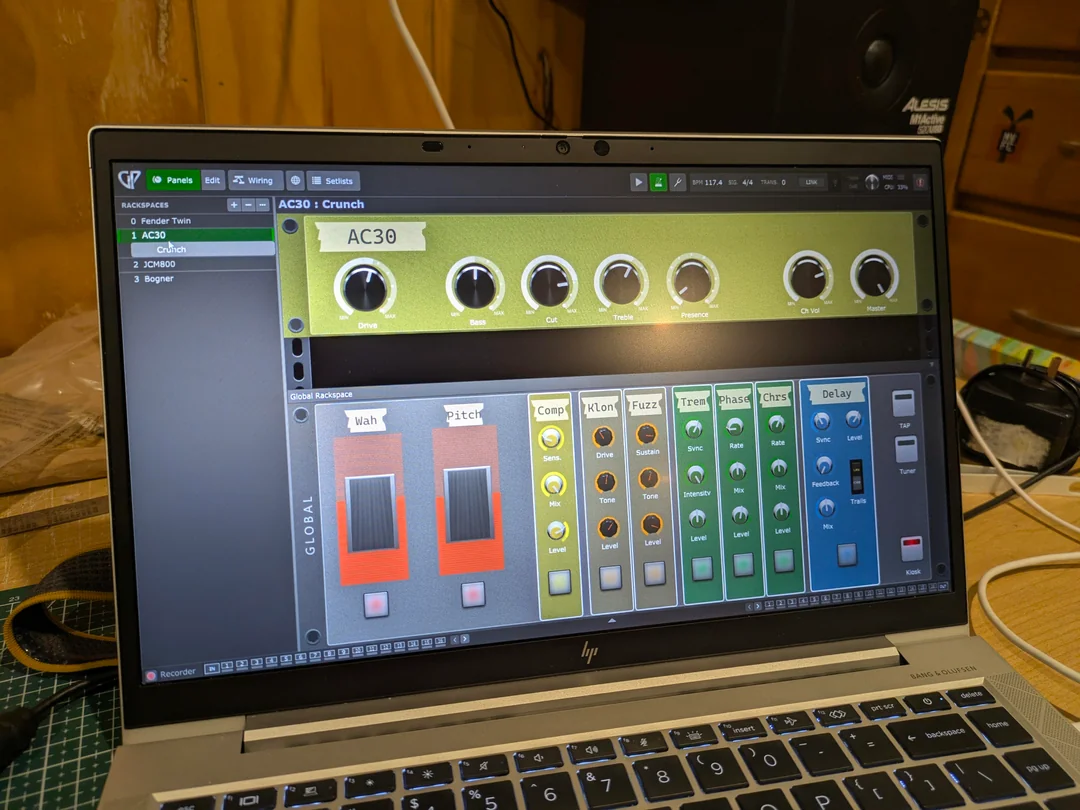
2x M-Vave Chocolate footswitches (with a third coming in the post!) hooked up via Bluetooth for control, with the expression pedal (DIY in an old gutted wah case) into one of the Chocolates.

- Top bank of switches (green, yellow, blue, red) witch the four amp models.
- Bottom bank switches the two drives, trem and phase
- Long press on the the first orange /bottom bank switches the comp, first green switches the chorus, and second green the delay.
- incoming third Chocolate will ultimately switch solo boost, do tap tempo duties and probably a long press on the tap button switching tuner. Might move Chorus and Delay to the spare switches then.
Stoked with how it’s come out - very usable and clear!
I can tweak key settings on the fly if needed and CPU steady at 33%.
Is actually 6x Helix instances under the hood, but Gig Performer is set up in such a way that only three are ever active at one time (pre-FX, chosen amp, post FX).
–
I’m absolutely going to gig with this. Three piece covers band. I have had a couple of rehearsals with this rig now and have been very impressed. Still tweaking levels a bit but 95% of the way there now.
Six instances are to allow me to keep the same Pre- and Post- effects across any amp selection. Helix Native doesn’t allow preset switching via MIDI on the VST for some unknown reason, so I need to switch Gig Performer racks instead. The six instances of Helix are as follows:
-
Pre FX - Wah, Pitch, Drives, Compressor, Trem.
-
2-5. - The four amps. Literally just the amp with cab in the preset.
-
- Post FX - Chorus, Delay, Reverb and solo boost.
Gig Performer has the “Global” section, so Helix 1 and 6 live in there - this means they’re active at all times.
Audio flows into the Global section, through the PreFX Helix, then out into the selected Rackspace. Helix 2, 3, 4, and 5 live in their respective Gig Performer rackspaces and get switched as needed.
Audio then flows back from the rackspace to the Global section, into the PostFX Helix then out.
Why this setup? Two answers:
-
As above, Helix Native doesn’t allow me to switch presets via MIDI. The best I could manage was snapshots but I ran out of space trying to shoehorn in all the various amps and FX I wanted.
-
I wanted “at a glance” status of the effects and amps - the Helix Native interface is useless in a live situation. Now, I have nice bright “LEDs” on my screen showing my which effects are active. And, I can tweak anything far more easily if needed.
Next step I think will be to relocate the laptop back to the rack and add a 15" touch screen on stage with me instead 
I’m finding it’s a really versatile rig.