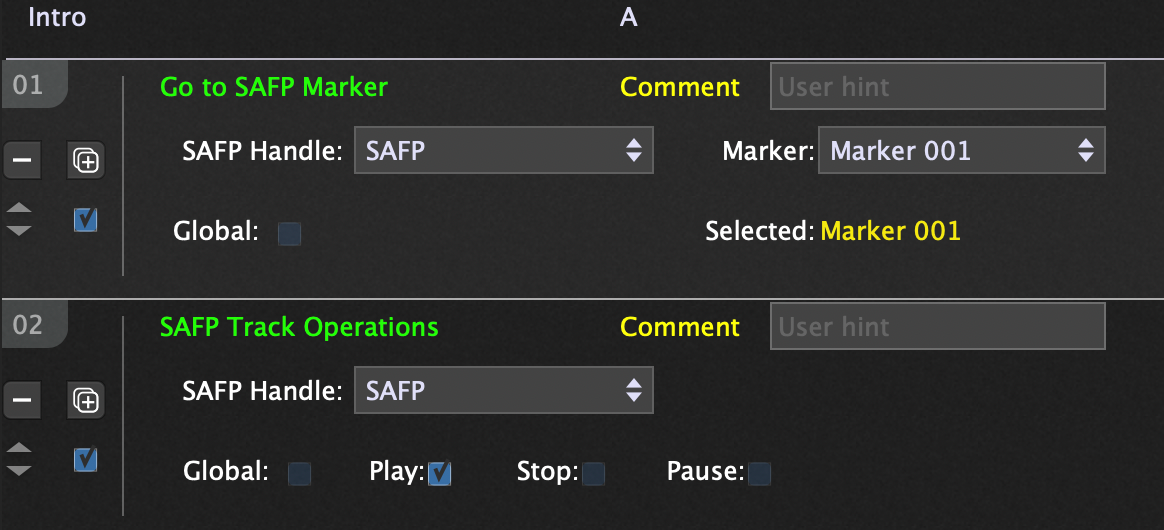
I have an audio sample I want to trigger. But, it it’s too long.
So, I want to set a marker and trigger a widget (in my case using “note on”) to start the sample at the marker.
I have tried what I thought it would require (Go to Marker Actions (and set to to start playhead) and others.) I know this seems pretty damn rudimentary, but so far, no luck.
Triggering the widget does not even cause the playhead to go to the marker. (I was able to start the audio at the recording and even stop it with note-ons, no problem, but I have not done it this way before).
I figure it must be something simple I am missing. Any help is appreciated.
Maybe this cannot be done (without scripting)? (I would be surprised)
So, if using looping does not work out for me (it starts the sample at the right place, but I would have to trigger a widget or change the variation to stop the sample from looping), the only option is to edit the sample?
When I try to do this, I do not have any option for text where it says SAFP Handle. (I can’t seem to get it to say SAFP). Also “Marker 1” does not seem to be an option (even though I inserted Marker 1 in the SAP).
I basically have the same issue with the second action.
I am trying to research “handles”. I think I have to create a ”handle” for the widget (?)
I will research this on my own. Let me work on it a bit before I ask you anything more.
Right now using a loop point allows me to start the audio (via a widget) where I want (a bit later in the sample).
But, I do not want it to loop back.
It seems the action items within the streaming audio player are automated based on duration (it you want to use a widget to trigger something (except for start and stop), I think you need to set that up elsewhere, like in a song part).
But, I think all I need to do is set up a marker in the SAP and trigger “stop” at the end of the sample. (Before it would loop back?)
So, then if I use loop points to start the audio, the “stop marker” should stop the audio before the loop ends automatically.
Does that makes sense? (If I am correct, it seems like an easier way to get where I want to go [Nope, that didn’t work].