Hi. Newbie here, can’t see this issue in the topics listed. I am trialling GP to replace Ableton after some lag issues (which are still being researched).
Anyway - Gig Performer. Pretty good, but for two things.
The main issue so far is that I created widgets and ‘taught’ them to use my MIDI controller knobs. It worked perfectly. But when I closed the program and reopened, the MIDI controller no longer played them back. They are still saved because I can see their names and midi switch numbers in the edit window, and they still work on the laptop, but the MIDI controller does not respond unless I reteach it.
Second thing is notes hanging, which has happened a small handful of times today in the few hours I’ve been testing. The panic button does the trick, but obviously it’s less than ideal. Google shows that someone else had the same issue in 2019 but they did not post whether it was resolved. There are no widgets yet on the patch used most recently so it’s not that.
Any ideas please? Much appreciated!
Windows 10, new (refurb) HP laptop with bags of memory - only used for music production - Impulse 61 & Scarlett 2i2. Everything updated and CPU streamlined. USB3 hub is Anker & supposed to be decent.
Hi @big.ship, welcome to the family.
Which version of GP are you using?
„but the MIDI controller does not respond unless I reteach it“
For my understanding:
You move your controller and the widget does not react?
On windows when you connect your controller on a different USB port the midi device name could change.
Therefore gig performer does not react to your controller.
Make sure you connect to the same USB port as you learned your widget.
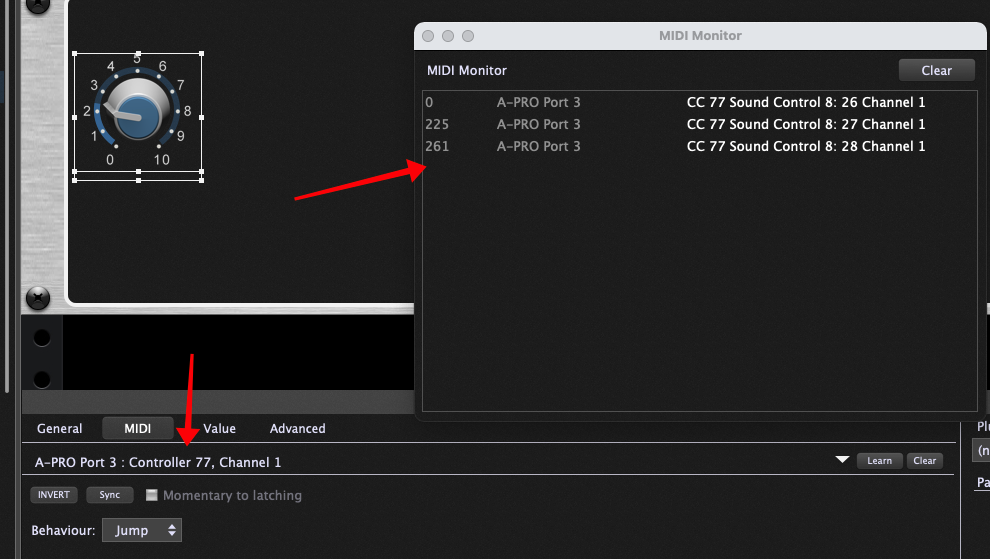
It would be useful to see screenshots of what was learned and what the Global MIDI Monitor is displaying when you turn the knob on your controller again (see image for example)
Yes, it’s that the widget does not react when moving the assigned knob.
However I don’t think it’s the USB port, because yesterday I closed and re-opened the program to test this issue. No USB port was changed - though I may have unplugged and reconnected the Impulse (to the same port) to see what woud happen.
Also, the user shouldn’t have to reteach the widgets if they for example use a backup USB hub.
Out of interest, slightly sideways on topic, I wonder how many users on here use hubs. Very few laptops seem to have enough ports for this sort of live performance! I’ve never used soft synths live before and I’m wondering how everyone sets up their peripherals on stage with mixers, dangling USB hubs and flash drives yadda yadda!
Thanks so much for replying.
It’s all working perfectly this morning, (hurray, but also, wha?)
SO a screenshot is unlikely to assist. I’l post one if it happens again (but fingers and toes crossed it doesn’t).
Perhaps – but it would still have been useful so that others could see what was going on and perhaps be helpful should the problem arise for someone else.
Agreed — that’s why we developed the Rig Manager. Use global names for your keyboards and control surfaces and if there’s a problem with the MIDI device name changing, then you can just use the Rig Manager to quickly redefine the associations and all your rackspaces will continue to work correctly. This feature was specifically designed to allow you to do this really quickly at a sound check.
“Perhaps – but it would still have been useful so that others could see what was going on and perhaps be helpful should the problem arise for someone else.”
Spot on, except if it isn’t happening now it won’t show what was happening when it wasn’t working.