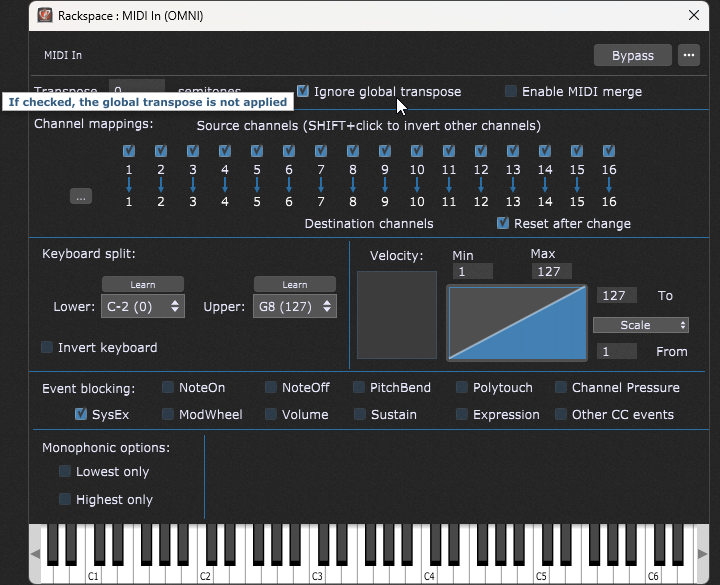
My background/use-case: I use GP4 in a live setting exclusively as a piano/pad instrument, controlled with an Arturia essential 88+korg nanokontrol.
I use a single rackspace for everything, with
many songs saved over the course of a few years using the same GP file. I rotate through variations assigned to different song parts, as quick way to switch between sound presets. Some of my songs are also globally transposed, which is where I’m running into my issue/question:
I am trying to integrate a simple one shot auxiliary percussion (kontakt) sampler into my rackspace. Really just 5-6 drum sounds, leaving the piano/pad part alone. Tambourine, clicks, etc. This might not be the most effective way to do this, but i figured assigning each sample to the last few keys of my keyboard in kontakt would do what I need… and I was able to do that without a problem so far. But as soon as I switch to a song that is globally transposed, the drum sounds get pushed up or down the keyboard, and I want them to be all in the same place every song.
Perhaps there’s a way to assign the drums to unused buttons on my korg nanokontrol? That would be ideal, as I’m already using all the buttons on my arturia for other things. That said, if assigning them to actual piano keys are the only way to do it, I guess I’m just trying to figure out…
How can I assign the one shot samples to those last few keys of my keyboard without them being pushed up or down, when switching to a song that is globally transposed? Or is it possible to assign them somehow to midi CC buttons instead of keys somehow? Thanks
Also, Gig Performer 5 now has a MIDI Transposer Plugin that allows you to avoid using global transpose and instead transpose a single or multiple other MIDI plugins. I have just now started using it and have started interfacing it with widgets (although this has required that I use a small GPScript to translate a double value of 0.0 to 1.0 into MIDI half steps and back again).
Well, it seems to me that one would in fact generally want to use the global transpose and nly exclude drums/percussion and effects that are in sample players.
Well, it seems to me that one would in fact generally want to use the global transpose and nly exclude drums/percussion and effects that are in sample players.
Well, yes and no. For me, the most difficult thing about use of a transpose button or function is to remember to set the damned thing back when it’s no longer needed. If I set it globally and forget to unset it, this can lead to a very embarrassing situation, especially if I’m a half step off from where I want to be. This, to me, is at least one argument for keeping this functionality in a tightly encapsulated location, if possible.
But having said that, I certainly don’t know Gig Performer as well as you, not even 1/100th, and so I will have to defer to your recommendations if you find mine to be faulty.
I guess that I haven’t figured out how to edit my posts here.
But another reason for my using the MIDI tranposer plugin is I just wanted to learn more about it since it is a new plugin and it gave me an excuse for having some fun playing with and learning more about GPScript. It’s far different from the OOP languages that I’m used to, such as Java, but it’s cool, and it has some real power and uses.
Though this is not a reason to recommend its use to others, unless they tend to be a bit nerdy like me.
Talking about GP-Script, there is a little Scriptlet i wrote which might help you with your transpose-issues. You can place it right after a MIDI-block and then set the transpose to +/-36 halftone steps, also it supports to set one MIDI channel to be excluded from the transpose (i.e. for drums).
Yes, I know that and am at fault for not having made that clear. It’s a procedural language, but I’ve been away from procedural languages since I left the Turbo Pascal universe about 40 years ago.
Map a widget to global transpose, and set that widget to always start with a set value on gig load and Rackspace activation. You will then need to intentionally change the widget value in edit mode
use setlist mode and set the transpose value in your song properties. This method may negate the need for touching global transpose.
Since following the above practices, I haven’t had any dirty looks from my band (at least not for transpose mistakes)